Page 1 of 1
Request for feedback: how to ensure uninterrupted HTTPS certificate usage within SAP?
Posted: Fri Mar 15, 2024 10:33 am
by Bernd Welter
Hi folks,
In the past, I have had several complaints from integrators and customers who were suddenly unable to send requests from their SAP systems to our cloud services because an PTV SSL certificate had expired.
I have never heard this or a similar complaint from
non-SAP integrators and customers.
Since I know that there is an "SAPverse", I wonder if there is something fundamentally different?
Bernd
PS: Besides SAP I know that there's a trust chain that is escalating through a set of certificates if the initial one is not valid... here are some examples:
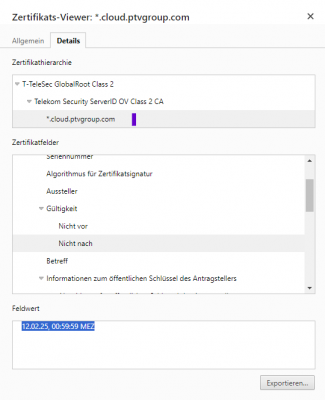 - PTV xServer Internet Certificate - expires in 2025
If this certificate is not valid anymore...
excalation to next level
|
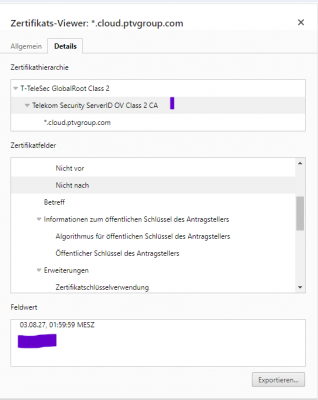 - intermediate certificate - expires 2027
and so on |
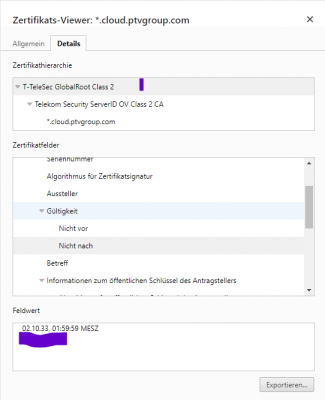 - root certificate as last resort - expires in 2033
|
|---|
Re: Request for feedback: how to ensure uninterrupted HTTPS certificate usage within SAP?
Posted: Fri Mar 15, 2024 10:47 am
by MISTERX
Guaranteed uninterrupted HTTPS communication in SAP systems can only be achieved with a correspondingly high level of effort. This is due to the system architecture. However, there is an adjustment screw that can be used to extend the maintenance cycles to the maximum and thus minimize the risk of interruption: use the certificate of a chain with the longest validity period - the root certificate!
In detail:
SAP systems have a Personal Security Environment (PSE), which is used for digital signature functions. Of the three different PSE types available in SAP, only the anonymous SSL client PSE is of interest in the context of PTV's 3rd party services. The application server uses the anonymous SSL client PSE to connect to other web servers where only server-side authentication is used. In other words, the intended purpose of the anonymous SSL Client PSE is to communicate with third-party systems that use server-only authentication in a manner similar to a normal web browser. When using the anonymous SSL client PSE, no SSL client certificate is sent to the server.
For the communication to work, a valid certificate from the third-party provider must be imported into the anonymous SSL client PSE, which is checked for validity by the SAP system at the time of the request.
The certificate of the third-party provider is either published by the provider itself or is exported with a web browser after calling up a URL of the service with HTTPS. The resulting binary-coded certificate file (.CER) is then imported into the SAP system by the base administrators using transaction STRUST.
As a certificate is valid for a limited period of time (from date, time to date, time), it is possible that a request may be sent after the certificate has expired. This is prevented by the SAP system with a corresponding error message. In principle, this problem can be prevented by using the check and warning functions available in the SAP system and importing a new valid certificate in good time. Nevertheless, the end of a certificate's validity often comes as a surprise, causing operational disruptions and forcing administrators to swap certificates at short notice.
To make matters worse, certificates from 3rd party services increasingly only have short validity periods - for some services it is only 30 days. This is justified by security requirements and leads to a high administrative effort for SAP systems, considering that SAP systems often consume a large number of third-party services.
Since the certificate of a service is the last link in a certificate chain and typically have the shortest validity, frequent certificate renewal can be avoided by importing the root certificate into the SAP system. With a little skill and logic, the root certificate can also be downloaded using a web browser. If necessary, countless instructions can be found on the Internet.
Re: Request for feedback: how to ensure uninterrupted HTTPS certificate usage within SAP?
Posted: Fri Mar 15, 2024 11:19 am
by Bernd Welter
Hi MisterX,
thanks for the background info ! So if I understand this correct, then a SAP administrator should install the "long term certificate" into his key store and then he can expect no further issues until 2033

?
If this is correct: could you provide just a little screenshot of how this import looks?
Is there a specific TRANSACTION CODE? How about the following approach?
To install a root certificate in SAP, you typically need to follow these general steps:
- Obtain the Root Certificate: First, you need to obtain the root certificate from a trusted Certificate Authority (CA) or from the source providing it. This could be in the form of a file, often in either .pem, .crt, or .cer format.
- Access SAP Management Console: Log in to your SAP system with administrative privileges.
- Navigate to Trusted SSL Providers: Go to the SSL Provider settings within your SAP system. The exact path may vary depending on the SAP version you're using. Typically, you can find it under Security settings or similar.
- Import the Root Certificate: Look for an option to import certificates or trusted CA certificates. Use this option to import the root certificate you obtained earlier. You may be prompted to provide the path to the certificate file or paste the certificate contents.
- Verify the Installation: After importing the certificate, it's essential to verify that the certificate has been correctly installed. You can do this by checking the list of trusted certificates within SAP to ensure the root certificate you just added is present.
- Restart SAP Services: In some cases, you might need to restart SAP services for the changes to take effect. This step is especially important if the SAP system caches certificates.
- Testing: After the installation, it's crucial to test the connectivity or any relevant functionality that relies on SSL/TLS communication to ensure that the certificate installation hasn't caused any issues.
Remember, these steps are general guidelines, and the exact process might vary depending on the version of SAP you're using and the specific configuration of your system. Always refer to the official documentation or consult with your system administrator for the most accurate instructions tailored to your environment.
Bernd
Re: Request for feedback: how to ensure uninterrupted HTTPS certificate usage within SAP?
Posted: Fri Mar 15, 2024 1:06 pm
by MISTERX
Hello Bernd!
I confirm that importing the root certificate is an administrative task that is always performed by specially trained and authorized employees in SAP systems. I expressly warn against not having such tasks carried out by the persons responsible for them, because an ERP system such as SAP is an extremely important part of a company and must be maintained and operated within the framework of regulations and laws. This is regularly checked by corresponding audits.
For this reason, I would like to refrain from providing detailed instructions on how to provide and import a certificate into an SAP system here in the forum. Incidentally, it would go beyond the scope of this article and SAP has created the corresponding documents itself and makes them available to its customers. If the SAP documents are not available or leave questions unanswered, other sources such as specialist publications and, of course, the Internet can be consulted.
In your answer, you mentioned 2035 as the expiry year. From this, one could conclude that the validity of the root certificate extends until 12/31/2035, 23:59:59. Unfortunately, the end of validity can occur on a random day and at a completely odd time. That's why I pointed out in my original post that the end of validity can come as a complete surprise.
I myself only use xServer Internet and not PTV-Developer. Therefore, I cannot say anything about the root certificate for the Developer. For xServer Internet, the validity (on the date of this post) is from 10/01/2008, 10:40:14 to 10/01/2033, 23:59:59, as can be seen in the attached screenshot of the SAP maintenance transaction STRUST.
Re: Request for feedback: how to ensure uninterrupted HTTPS certificate usage within SAP?
Posted: Fri Oct 18, 2024 8:19 am
by Bernd Welter
IMPORTANT: Action required - We would like to inform you that we plan to change our SSL certificates.
Details can be found here:
PTV xServer internet - SSL certificate update to Subject Alternative Name (SAN) certificate
Please take your time to read
Re: Request for feedback: how to ensure uninterrupted HTTPS certificate usage within SAP?
Posted: Thu Sep 25, 2025 1:35 pm
by Bernd Welter
Hi there,
I just learned from HEISE: "
Beschlossen: Lebensdauer für TLS-Serverzertifikate sinkt auf 47 Tage" that the lifespan of TLS server certificates is supposed to be shortened based on the following roadmap:
- Today: 398 days at max
- From March 15th, 2026 : reduction to 200 days
- From March 15th, 2027 : reduction to 100 days
- From March 15th, 2029 : reduction to 47 days
This causes additional efforts for administrators and within PTV Logistics we are already discussing how to reflect this in our future processes.
As SAP driven clients are also supposed to align their processes this requires a proper strategy which isn't in place yet.
As long as we are not done with this internal discussion we will keep the current process.
Bernd
Re: Request for feedback: how to ensure uninterrupted HTTPS certificate usage within SAP?
Posted: Fri Sep 26, 2025 7:15 am
by Bernd Welter
As some of you already asked for the new certificates I want to share this info from Isabel with you:
We will start with the certificate updates next week. We had to realign the schedules due to some unexpected, urgent CVE related server fixes. Today we will communicate the schedule for the updates.
Best regards,
Bernd